
POS and Inventory Integration in Indonesia: Three Routes and Which One Fits
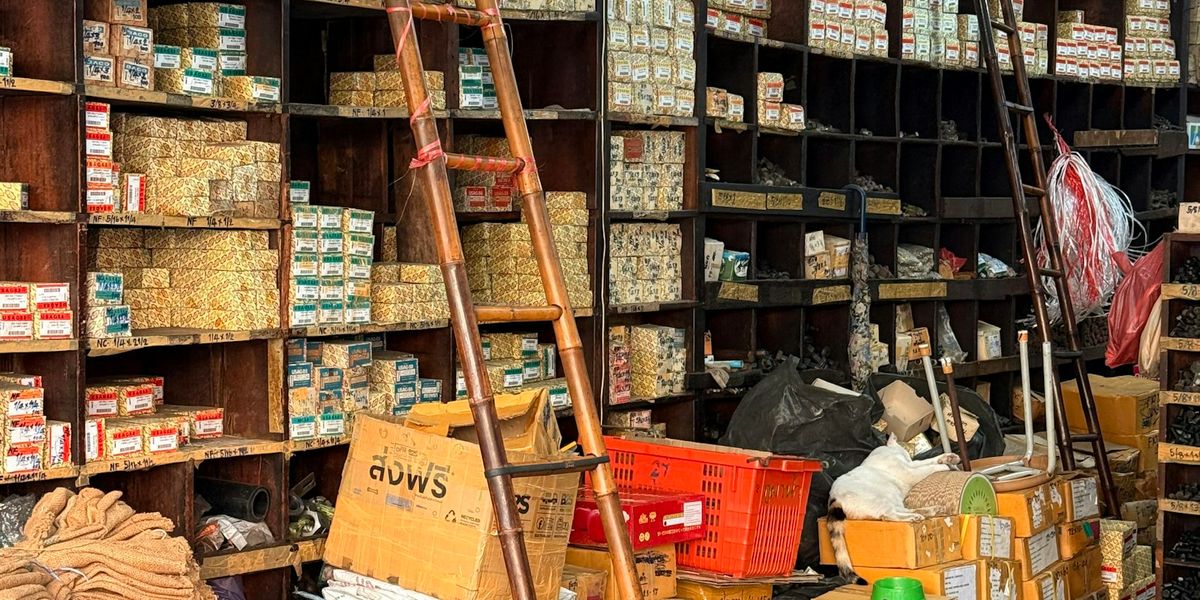
POS inventory integration in Indonesia comes down to three routes: run one app that handles sales and stock together, switch on a ready-made connector one of your vendors already ships, or wire the two systems together through an API. There is a fourth nobody likes to admit to — a scheduled file export and import — and for a lot of shops it is the honest answer. The route is not the hard part. What derails projects like this is almost always the product master data: codes, names and units that do not match across the two systems.
Vendor names, plan limits and technical details below were read off each provider’s own page on 13 October 2026.
Why the till and the stockroom never agree
Three causes, and none of them is technology.
- The same item is recorded twice. The till records a sale, then somebody opens the stock file in the evening and takes the number down by hand. Every time that step is skipped, the gap is permanent.
- The units differ. The till sells single bottles; the stockroom counts cartons. If a carton is recorded as 20 in the master data when it actually holds 24, every carton that leaves the building loses four bottles that will never be found again.
- Nobody is allowed to decide. When the two numbers disagree, there is no rule about which system is right. So both get nudged a little, and now both are wrong.
The case we meet most often: a beverage distributor in Taman, Sidoarjo. The till sells singles, the stockroom receives cartons. Numbers look tidy until the month-end count, and the gap always sits on items sold in two units. The carton-to-bottle conversion in the master data was wrong on eleven items — not because the software was bad, but because that figure was typed in once, three years ago, by somebody who left long before.
Integration does not fix that. It just makes it faster.
Three routes to POS inventory integration
Cheapest to most expensive, which happens to be the same order as most-often-right to least-often-right.
Three integration routes, plus one middle path
| Route | Fits when | What you need ready | The catch |
|---|---|---|---|
| One app for both | One location, one stockroom, no accounting system you are obliged to keep | A one-off master data migration, then training for the till staff | Switching vendors later gets expensive; stock features inside POS apps are usually shallow |
| A vendor’s ready-made connector | Your two systems already appear on each other’s integration lists | An active account on both sides, then an item-by-item mapping | The vendor decides what syncs, not you |
| A connection through an API | One system genuinely cannot be replaced — say the accounting package you have run for years | Published API documentation from both sides, one developer, and a maintenance budget | It goes quiet without warning when either vendor changes the API |
| A scheduled file export and import | Still under a few hundred transactions a day, and the numbers do not have to be current to the minute | One agreed file format and one person who owns it | Always a few hours behind, and the first thing dropped on a busy week |
Accurate Online API details read from accurate.id/api-integration/api-example/; the POS, eCommerce, bank and custom system line from jurnal.id/id/integrasi/; the Jurnal–Olsera connector from Jurnal’s own page, updated 31 July 2026; the Qasir feature row from qasir.id/en/qasir-pro — all as of 13 October 2026. No price for integration work appears here on purpose: not one figure could be confirmed against a seller of record, and an invented number does more damage than no number.
For a single-location shop the first route almost always wins. Not because it is more sophisticated, but because there is nothing left to sync — the stock figure exists in one place. Trouble starts when you already run an accounting system you cannot walk away from.
Route two gets skipped most often despite being cheapest: check your vendors’ integration lists before paying anyone to build anything. Mekari Jurnal states on its integration page that the service "dapat terhubung dengan POS, eCommerce, bank dan custom system", and for Olsera POS the connector already exists — Jurnal’s own page, updated 31 July 2026, says "Stok barang akan terupdate secara otomatis sesuai dengan transaksi yang terjadi". If your pair is listed, the remaining work is mapping products.
An API connection only enters the conversation when one system truly cannot be swapped out. The first thing to check then is not a developer’s rate but whether the API documentation exists at all — an API being the official door a vendor opens so another system may read and write its data. Accurate Online has one: documentation opens up once you register as a developer at account.accurate.id/developer, permissions are split by purpose (separate rights to read items, save items, and read sales invoices), and every call must name which database it addresses.
Confirm this before signing anything: not every POS app has that door. Qasir and Olsera, two of the most widely used among small shops here, publish no public developer documentation — a search on 13 October 2026 turned up none. Qasir’s Pro page does carry a row reading "Export and edit products in bulk", and that row sits in the paid tier. For a pair like that, the realistic route is the fourth one.
If the two systems you own genuinely cannot be joined and the data matters too much to wait, building one system of your own becomes reasonable — that is jasa pembuatan aplikasi territory, where the workflow follows how your shop already runs rather than the other way round.
The real work: one product list, two systems
Whichever route you take, the long part is not the connecting. It is making the two product lists agree. These five steps need no vendor, and they should be finished before one shows up.
- Export both product lists untouched. One from the till, one from the stock system. Resist cleaning them first — the whole point is to see how far apart they are.
- Fix one code per item. Not the name, because names are always typed differently: "Aqua 600ml", "aqua 600 ml", "AQUA 600". The code can be anything as long as each item has exactly one, and the same code is used on both sides.
- Pick a base unit, then write down the conversion. Usually the smallest unit you actually sell. Carton contents become a conversion figure, and that figure gets checked against the physical carton, not against somebody’s memory.
- Clear out duplicates and dead stock. An item carrying two codes will still drift after integration, only faster. Items that have not moved in a year get deactivated, not deleted — their sales history is still worth something.
- Count the shelves once, on one day. Stop transactions briefly, count, then enter the same figure in both systems. This is the only honest chance you get to start from zero.
Once those five are done, "connector or API?" becomes a question with an answer.
Decide which system owns the stock figure
One decision gets skipped almost every time, and it is the usual reason a working integration still produces two different numbers: which system is allowed to decrease stock.
Usually the till, because that is where goods physically leave. The stock system receives, adjusts and reports — but does not invent figures of its own. If both systems may change stock with no rule about who wins, you have not integrated two systems, you have duplicated the problem.
Our view, and what you trade for it
In our experience most single-location shops do not need an integration. They need to stop running two systems. Integration earns its keep when something genuinely cannot be replaced: an accounting package that has carried years of history, or head office’s system if you are the branch.
And here is the uncomfortable half. An API connection adds something you maintain forever — vendors change APIs, tokens expire, one side upgrades and the sync stops without a sound. The dangerous failure is not the integration that dies outright; it is the one running at half strength that nobody notices until the next stock count. Budget for routine checks and name an owner, or take the simpler route and accept the lag.
If you are standing in front of two systems you already own and are not sure which one should give way, our software house team in Sidoarjo tends to start by auditing the master data before touching an API, and more than once the project turned out smaller than expected. For a second opinion before committing, konsultan IT Sidoarjo is a reasonable place to ask first.
Does integration make stock figures accurate on its own?+
How long does POS and inventory integration take?+
What if my POS app has no API?+
IT consultants helping Indonesian businesses choose and manage cloud infrastructure, develop software, and keep IT operations running smoothly. Based in Sidoarjo, serving clients across East Java and Indonesia.
Related Articles

How to Back Up Business Data: The 3-2-1 Rule and a Restore Test You Can Run This Afternoon
How to back up business data with the 3-2-1 rule, cloud storage prices in Indonesia as of October 2026, and a five-step restore test you can run today.
POS System Cost in Indonesia: Subscriptions, Hardware, and Year Two
POS system cost in Indonesia: what five local apps charge as of October 2026, what the hardware runs to, and the two costs no pricing page lists.

QRIS Merchant Registration in Indonesia: Steps, Documents and the New MDR Rates
QRIS merchant registration in Indonesia: the four steps, what providers actually ask for, and the MDR rates that changed on 1 October 2026.